How to Scan for Options Trading Opportunities

Trade Discovery
Building the Scan

Finding options trading opportunities can feel like searching an enormous market for a handful of useful setups. A scanner changes the process by letting you define what you are looking for before you start opening charts.

Instead of asking, “What should I trade today?”, start with a more useful question: “Which stocks currently match the conditions behind my strategy?”

The goal is not to build a filter that chooses an option trade for you. It is to take a large market, apply relevant conditions, and produce a manageable shortlist of underlying stocks that deserve deeper analysis.

From Market to Trade Candidate
This guide: turning strategy ideas into useful scanner conditions

Possible Signals
Trend
Momentum
Volume
Volatility

→
Your Rules
SCAN + FILTER
Keep only what matches

→
Output
SHORTLIST
Candidates to analyze

Start With the Setup

Decide What You Are Looking For Before You Scan

One of the easiest ways to create an unhelpful scan is to open a scanner and start selecting filters simply because they are available. Reverse that process.

Ask This First
What does a stock need to be doing for this strategy to make sense?

A directional momentum setup might depend on trend, price movement, relative strength, or volume. A breakout setup might require price to approach or cross a defined level. An indicator-based strategy might depend on RSI, MACD, moving averages, or another measurable condition.

Once you can describe the setup clearly, you can begin translating it into scanner rules.

Make It Measurable

Translate the Trading Idea Into Scanner Conditions

A trading idea becomes scannable when subjective descriptions are converted into conditions a tool can evaluate consistently.
Trading Idea
Scanner Translation

“The stock is trending higher.”
Define the price or moving-average relationship that represents the trend.
“Momentum is strong.”
Choose the momentum measurement and threshold relevant to the setup.
“Volume is picking up.”
Compare current volume with a defined reference or average.
“Price is breaking out.”
Define the price level or relationship that constitutes the breakout.

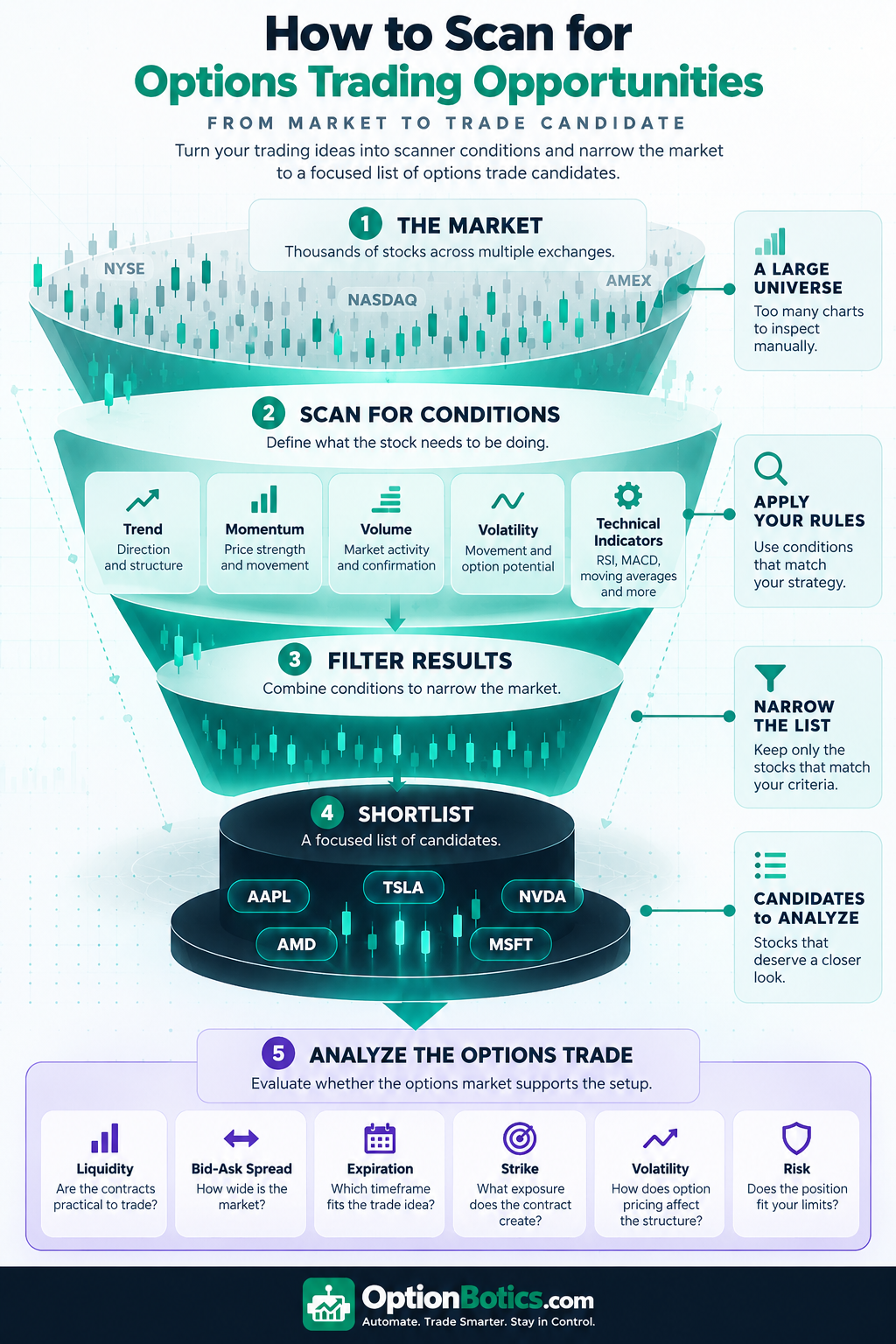
How to scan for options trading opportunities infographic showing the process from the broad stock market through scanner conditions, filtering, a shortlist, and options trade analysis
How a broad stock market can be narrowed into a focused list of options trade candidates. Click to expand.

Build the Filter

Useful Scanner Conditions for Options Traders

You do not need every available filter. Choose the conditions that describe the setup you are actually trying to find.

Price + Volume
Narrow the universe by price and identify underlying stocks with the level of market activity relevant to your process.
Trend + Momentum
Look for directional structure and the type of price movement required by the strategy.
Volatility
Use volatility-related conditions when movement itself is part of the trade thesis.
Technical Indicators
RSI, MACD, moving averages, and other indicators can become searchable conditions when they are part of your rules.

If technical indicators play a major role in your process, see our guide to using RSI, MACD, moving averages, and other technical conditions in systematic trading.

Narrow the Market

Combine Conditions Instead of Searching for One Perfect Signal

One indicator can produce too many results. A more focused scan can combine a small number of conditions that represent different parts of the setup.

Example: Directional Momentum Search
Price Range
+
Trend
+
Momentum
+
Volume

The exact definitions depend on the strategy. Each condition should have a reason for being part of the scan.

Our guide to automated momentum strategies in options trading goes deeper into how directional conditions can become explicit strategy rules.

Put the Scan Into Practice
Build the search around your rules.
TrendSpider is the tool we would explore when scanning and systematic technical analysis are central to the research workflow. It is a natural fit for traders who want to spend less time manually searching charts and more time evaluating candidates that match defined conditions.

The Second Filter

A Stock Candidate Is Not Automatically an Options Trade

Once a stock passes the scan, the job changes. Now you need to decide whether the options market and the potential position support the setup.

Underlying
Does the stock match the setup?
Trend, momentum, volume, price behavior, volatility, and other strategy conditions.

Options
Is there a trade worth considering?
Contract liquidity, bid-ask spreads, expiration, strike selection, volatility, strategy structure, and risk.

Some stocks will pass the scan and fail this second evaluation. That is useful filtering, not a failed scan. The scanner has already reduced the amount of market you needed to inspect manually.

Charts + Alerts
Prefer a chart-centered workflow?
TradingView is worth exploring when chart analysis and alerts are central to how you research potential setups. Alerts can also help you watch for conditions that have not occurred yet instead of repeatedly checking the same charts.

Explore TradingView →

Get a $15 credit toward your subscription through our link.

Choosing the Scanner
Match the tool to the workflow.
Once you know what you want to scan for, compare the filtering, technical-analysis, alert, and workflow capabilities that matter to your process.

See What to Look For in a Stock Scanner →

SIGNALS → FILTERS → SHORTLIST

A Good Scan Starts With a Good Question

A scanner does not need to identify the next winning trade. It needs to narrow the market around the characteristics your strategy requires.

Start with the setup, translate it into measurable conditions, and review the resulting shortlist. Then separately determine whether the options market, strategy structure, and risk justify taking the idea any further.